




Course creation has always been one of the most time-consuming parts of corporate training. L&D teams need to gather source material, work with subject matter experts, write learning objectives, build slides or modules, create assessments, add media, review content, publish to an LMS, and update courses when policies or products change.
In 2026, AI is changing that workflow.
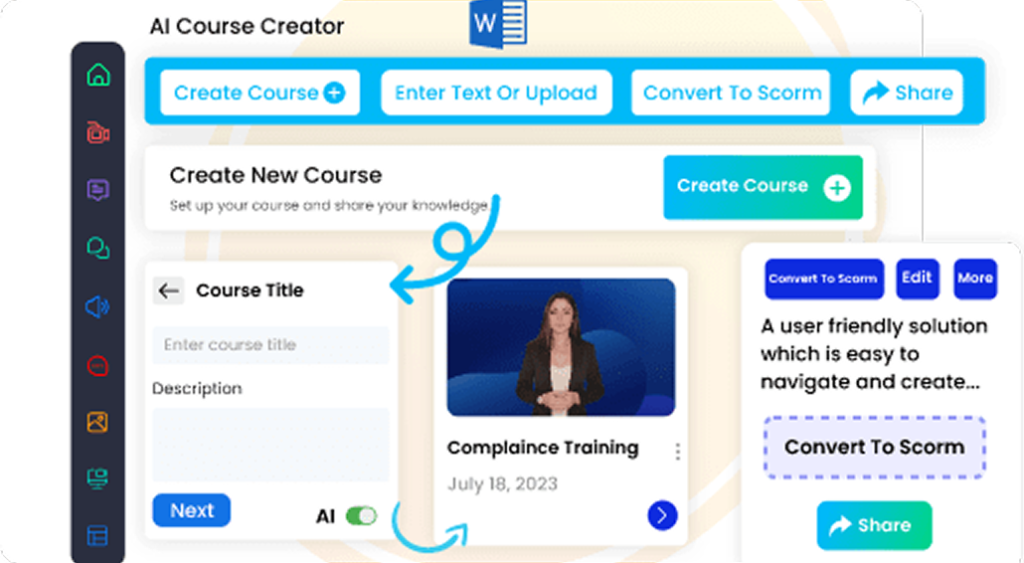
AI course creation tools can now help L&D teams turn documents, presentations, videos, and raw ideas into structured training content. For example, AI Course Creator supports AI-assisted module generation, assessments, summaries, learning paths, and document-to-course conversion from formats such as PowerPoint, Word, PDF, and text files.
But the real value of AI is not “click once and publish.” The value is faster first drafts, easier updates, better personalization, and more time for instructional designers to focus on quality.
Why AI Course Creation Matters in 2026
Course creation has always been one of the most time-consuming parts of corporate training. L&D teams need to gather source material, work with subject matter experts, write learning objectives, build slides or modules, create assessments, add media, review content, publish to an LMS, and update courses when policies or products change.
In 2026, AI is changing that workflow.
AI course creation tools can now help L&D teams turn documents, presentations, videos, and raw ideas into structured training content. For example, Paradiso’s AI Course Creator supports AI-assisted module generation, assessments, summaries, learning paths, and document-to-course conversion from formats such as PowerPoint, Word, PDF, and text files.
But the real value of AI is not “click once and publish.” The value is faster first drafts, easier updates, better personalization, and more time for instructional designers to focus on quality.
What AI Course Creation Means
AI course creation is the use of artificial intelligence to help design, generate, improve, and publish learning content.
An AI course creator can assist with tasks such as:
- Creating course outlines from a topic or document
- Turning PDFs, PPTs, and manuals into learning modules
- Writing lesson content and summaries
- Generating quizzes and knowledge checks
- Creating scenario-based activities
- Producing AI voiceovers and video scripts
- Translating training content
- Suggesting improvements to clarity and engagement
- Preparing SCORM-compatible course outputs for LMS delivery
AI eLearning authoring tool, for example, includes AI-powered narration, themes, editable SCORM-compatible templates, AI voiceover, translation, video generation, speech-to-text, and simulation-related features.
For L&D teams, this means course creation becomes less dependent on starting from a blank page.
How AI Is Changing the Course Creation Workflow
1. From Blank Page to AI-Assisted First Draft
Traditional course development often starts with scattered material: policy documents, SME notes, PowerPoint decks, SOPs, product manuals, webinar recordings, or compliance guidelines.
AI can help convert those assets into a first draft. Instead of manually building every module from scratch, L&D teams can upload or paste source content and ask AI to suggest a course structure, learning objectives, lessons, summaries, and assessment questions.
This does not remove the need for instructional design. It reduces the time spent on basic content assembly.
2. Faster SME Collaboration
Subject matter experts are often busy. They may not have time to write full training content, but they can review, correct, and approve AI-generated drafts.
AI changes the SME workflow from “please create the course content” to “please validate this structured draft.”
That small change can speed up course development because SMEs can focus on accuracy, examples, risks, and business context rather than formatting lessons.
3. More Personalized Learning Content
AI makes it easier to adapt one course for different audiences.
For example, a product training course can be adjusted for:
- Sales teams
- Customer support teams
- New hires
- Channel partners
- Managers
- Regional teams
The core content may stay the same, but AI can help adjust examples, tone, scenarios, quizzes, and job-role context. LinkedIn highlights that AI is enabling more dynamic, on-demand, and personalized learning technology at scale.
4. Quicker Course Updates
Many corporate courses become outdated quickly. Product features change, compliance rules shift, internal processes evolve, and brand messaging gets updated.
With AI course creation, L&D teams can refresh existing content faster. They can ask AI to compare old and new source material, summarize changes, rewrite outdated sections, generate new knowledge checks, or simplify complex updates for learners.
This is especially useful for compliance training, onboarding, sales enablement, customer education, and product training.
5. Easier Multimedia Production
Modern learners expect more than text-heavy slides. They want short videos, voiceovers, visuals, simulations, quizzes, and interactive content.
AI authoring tools can support multimedia creation by generating narration, scripts, visuals, translations, and interactive elements. Authoring tool page lists AI voiceover, AI video generation, translator, speech-to-text, and AI simulation among its feature areas.
This helps smaller L&D teams create richer learning experiences without needing a large production team.
Where Human Instructional Designers Still Matter
AI can generate content quickly, but speed is not the same as learning quality.
Instructional designers still play a critical role in:
- Defining learning objectives
- Aligning content with job tasks
- Checking accuracy
- Removing bias or unsupported claims
- Designing practice activities
- Validating assessments
- Ensuring accessibility
- Reviewing learner experience
- Measuring business impact
McKinsey’s 2025 AI workplace report found that almost all companies invest in AI, but only 1% believe they are at maturity, which shows that adoption alone does not equal effective implementation.
For L&D, the same principle applies. Buying an AI tool is not enough. Teams need a clear workflow for review, governance, quality control, and measurement.
Technical Considerations for AI-Created Courses
AI-generated courses still need to work inside the broader learning ecosystem.
Before publishing AI-created content, L&D teams should check:
LMS Compatibility
Courses should be easy to publish, upload, and track in an LMS. SCORM remains important because it provides technical standards that help eLearning content and LMS platforms communicate with each other.
Accessibility
AI-generated content should be reviewed for accessibility. W3C’s WCAG 2.2 guidelines explain how to make web content more accessible for people with disabilities and more usable across devices.
Data Privacy
L&D teams should avoid uploading confidential employee, customer, legal, or proprietary business data into AI tools unless the platform’s privacy and security controls are approved.
Version Control
AI makes it easy to create multiple versions of a course. Teams need clear naming, approval, and publishing rules so learners do not receive outdated training.
Assessment Quality
AI-generated quizzes should be checked carefully. Questions should test real understanding, not just recall. For compliance or safety training, assessments should be validated by a qualified reviewer.
Best Practices for L&D Teams Using AI Course Creation
Start With a Clear Learning Goal
Do not start with the AI prompt. Start with the business problem.
Ask:
- What should learners do differently after this course?
- Which role is this for?
- What mistakes should the course prevent?
- What behavior or performance metrics should improve?
Use AI for Drafting, Not Final Approval
AI can create outlines, lessons, quizzes, and summaries, but final approval should stay with L&D, SMEs, compliance teams, or business owners.
Build Reusable Templates
Create templates for onboarding, compliance, product training, sales training, and customer education. AI works better when it follows a consistent structure.
Add Real Scenarios
AI can generate generic examples, but real workplace scenarios make training more useful. Add customer objections, policy situations, safety incidents, software workflows, or manager conversations.
Review for Accessibility and Inclusion
Check alt text, captions, reading level, contrast, keyboard navigation, and inclusive language before publishing.
Track Results in the LMS
Course creation is only one part of the training cycle. Use LMS analytics to track enrollment, completion, quiz performance, learner feedback, and business outcomes.
How AI Helps L&D Teams Create Courses Faster
AI helps L&D teams simplify course creation by turning ideas and source files into interactive eLearning content. Teams can use AI-assisted content generation to create modules, assessments, and summaries, then improve the course with multimedia, narration, translation, simulations, and SCORM-compatible output.
This is especially useful for teams that need to produce training at scale, such as:
- Employee onboarding
- Compliance training
- Sales enablement
- Customer training
- Product education
- Partner training
- Process training
- Microlearning programs
When connected with an LMS such as Paradiso LMS, AI-created courses can be delivered, tracked, assigned, and reported from a central learning platform.
Conclusion
AI is changing course creation for L&D teams by making the process faster, more flexible, and easier to scale. In 2026, teams can use AI to move from raw content to structured training modules, quizzes, summaries, translations, voiceovers, and LMS-ready courses in less time.
But AI should not replace instructional design judgment. The best results come when L&D teams combine AI speed with human expertise, SME validation, accessibility checks, and LMS reporting.
For organizations that need to create more training without lowering quality, AI course creation is becoming a practical advantage.

FAQs
AI course creation uses artificial intelligence to help generate, structure, improve, and publish training content. It can support course outlines, lessons, quizzes, summaries, voiceovers, translations, simulations, and LMS-ready modules.
No. AI can reduce repetitive content development work, but instructional designers are still needed for learning strategy, content accuracy, learner engagement, accessibility, assessment quality, and business alignment.
L&D teams can use AI to convert documents, PPTs, PDFs, manuals, and raw notes into structured modules. They can also generate quizzes, summaries, scripts, translations, and microlearning content.
They can be, depending on the authoring tool. L&D teams should choose an AI authoring tool that supports SCORM export or LMS integration, so courses can be uploaded, tracked, and reported in a learning management system.
Review accuracy, tone, accessibility, source validity, learning objectives, assessment of quality, compliance requirements, and LMS tracking settings before publishing.
AI course creation can support onboarding, compliance training, sales training, customer education, product training, partner training, leadership development, and microlearning.